The question “Tor or VPN?” is typically posed the way one might ask when shopping, as though one of the two is clearly superior and you only need to decide which. It is this kind of framing that causes so many articles comparing the two to end with a shrug. Both tools conceal information, but they conceal different things from different people, and in return they ask you to place your trust in different parties.
So this guide begins with a different question. Who are you really trying to avoid? Your broadband provider? The Wi-Fi at the café? Advertisers? A website that wants to know your actual location? A government? Each of these answers points to a different tool, and in some cases to both or to neither.
The question matters more in 2026 than it did a few years ago. Because of age-verification laws, VPNs have become far more widely used, and politicians have taken notice. Utah’s SB 73, which was signed in March 2026, was the first US law to target people who use VPNs to bypass age checks, and in the UK both Members of Parliament and the Children’s Commissioner have openly spoken about restricting access to VPNs. Meanwhile, the Tor Project now offers its own VPN-type app for Android, and Tor Browser 15.0.25 was released on 12 October. The distinction between these tools is less clear than the marketing suggests.
Below you will find a simple explanation of how each one works, a table showing who can see what, a direct comparison of the practical matters, and a number of ordinary situations, each with a straightforward answer. If any of the terms are unfamiliar to you, our Tor glossary explains them.
How each one actually works#
A VPN creates a private tunnel to one company’s server. Your device encrypts all the data and sends it to a server operated by the VPN provider. This server then retrieves websites on your behalf. Your internet service provider only sees an encrypted data stream heading to the VPN. The website sees the address of the VPN server rather than your own. The system is simple and quick, and it protects all the applications on your device.
Tor is a relay race across three strangers. Tor Browser encrypts your traffic in three layers and forwards it through three computers run by volunteers, called relays, which are selected at random from several thousand. Each of these computers removes one layer. The first one knows who you are but not where you’re going. The last one knows where you’re going but not who you are, and the one in the middle knows neither. The system is free, it is operated by a non-profit organisation, and it is noticeably slower.
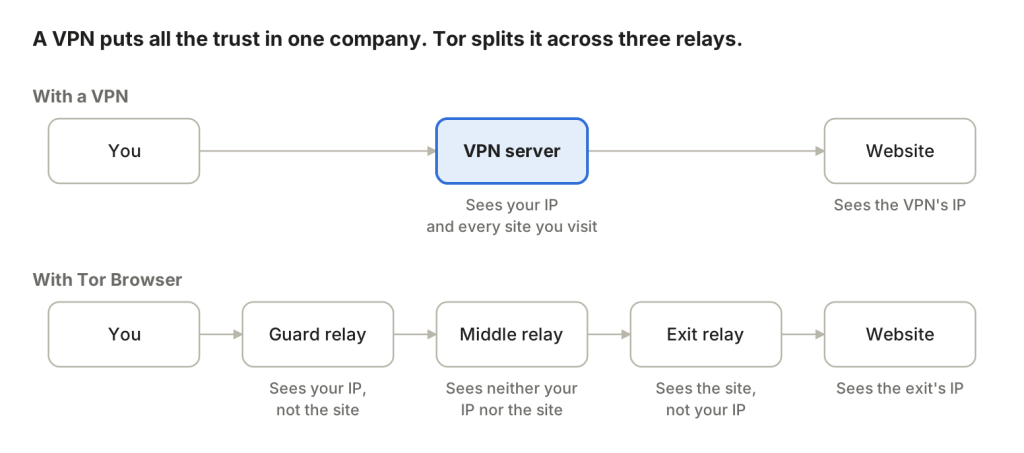
The image illustrates the most important difference. A VPN does not get rid of the watcher. Instead, it replaces your internet service provider with the VPN company, which then sees your real IP address and every website you connect to, all in one place. Whether or not this is a worthwhile exchange comes down completely to how much you trust them, and “no-logs” promises are merely promises, even if they have been verified by an independent audit.
Tor gets rid of the single watcher. Since no one relay sees both ends of the communication, there is no company that can be subpoenaed, hacked or bought to hand over your complete browsing history. You’re not placing your trust in a business. Rather, you’re relying on the fact that the three relays you ended up with aren’t all secretly operated by the same person, a situation which the network is designed to make extremely unlikely.
People often overlook a second point. A VPN is merely a pipeline. Your ordinary browser still sends along your cookies, your logged-in accounts, and a fingerprint that lets someone pick you out of a crowd, no matter what IP address it seems to come from. Tor Browser, on the other hand, is both a network and a browser. It deletes cookies when you shut it down and makes every user appear identical to websites. That is why “a VPN together with Chrome” and “Tor Browser” are not two versions of the same thing.
Who sees what#
Most comparisons leave this table out, yet it’s the one that really answers the question. Find the row for whoever you’re concerned about and read across.
| Who’s watching | With no protection | With a VPN | With Tor Browser |
|---|---|---|---|
| Your internet provider or mobile carrier | Every site you visit and when | Only that you’re connected to a VPN | Only that you’re using Tor, and not even that if you use a bridge |
| Whoever runs the Wi-Fi (café, hotel, office, school) | Every site you visit | Only that you’re using a VPN | Only that you’re using Tor |
| The website you visit | Your real IP address and rough location | The VPN’s address, but still your logins, cookies and browser fingerprint | An exit relay’s address, with fresh cookies and a fingerprint shared by every other Tor user |
| Advertisers and trackers across sites | Can follow you around by cookies and fingerprint | Can usually still follow you, because a VPN doesn’t touch cookies | Much harder, because cookies are wiped and every user looks alike |
| The VPN company | Not involved | Your real IP and every site you connect to | Not involved |
| Tor relays | Not involved | Not involved | Each sees only one piece, and no single relay sees both ends |
| A government with legal powers | Can ask your provider | Can ask the VPN company, if it’s in reach | No single place to ask, though a very large observer watching both ends can sometimes match traffic |
Once you read it this way, three things stand out.
First, a VPN is very effective against your local network and your internet service provider, but it offers little protection against websites themselves. If your concern is the Wi-Fi at a hotel or a broadband provider collecting information about how you browse, a VPN will deal with that problem. However, if your concern is a website or an ad network building a profile of you, a VPN on its own makes very little difference, since the browser you are using is still the same one.
Second, Tor can protect you from more parties at the same time, but it cannot protect you from yourself. Suppose you log into your personal email or social media account via Tor. In that case, the website will know precisely who you are. Tor has concealed your location, but your password has still revealed your name. This is the first item on our list of mistakes that break your anonymity on Tor, and it applies just as much to VPNs.
Third, the final row is the honest one. Neither tool makes you invisible to a powerful state. A VPN gives the state one company to apply pressure to. Tor gives it no single company, yet the Tor Project itself admits that someone able to monitor traffic going in and out of the network might sometimes be able to connect the two. For most people this is a theoretical issue, but for a small number of journalists and activists it is a real concern, which is why the Tor Project includes extra safeguards such as long-lived guard relays.
Head to head on the practical stuff#
Privacy is only half the issue. The other half is whether the tool matches the way you actually use the internet.
| Feature | VPN | Tor Browser |
|---|---|---|
| Speed | Close to your normal connection on a good service | Noticeably slower, because traffic hops through three relays |
| Cost | Usually a monthly subscription. Free VPNs often pay their bills with your data | Free, run by a nonprofit and volunteers |
| What it covers | Every app on the device | Only what you do inside Tor Browser |
| Streaming and gaming | Works well and is what most people buy it for | Poor. Slow, and many services block Tor |
| Logging into your own accounts | Fine | Works, but it ties that session to you and defeats the point |
| Websites blocking you | Some block known VPN addresses | More sites challenge or block Tor exit relays with CAPTCHAs |
| Getting past national censorship | Works until the censor blocks that VPN, which many now do | Built for it, with bridges and pluggable transports |
| Who you trust | One company | A network designed so no single party sees everything |
| Access to .onion sites | No | Yes |
| Setup | Install an app and press connect | Download Tor Browser and press connect |
Speed, honestly#
Tor is slower, and it’s worth being completely open about that. Each page passes through three relays in different parts of the world, and onion sites typically go through about six. There have been some improvements, partly due to features such as Conflux, which splits traffic between two routes and uses the faster one, but you’ll still notice the slowdown with videos or large downloads. If speed is what you primarily need, Tor isn’t the right tool, and that’s fine. It was never intended to be.
The legal picture in 2026#
Both tools are legal in most countries, including the United States, the United Kingdom and the European Union. That remains the case, but the situation is changing, and it is changing faster for VPNs than for Tor.
The pressure on VPNs comes mainly from age-verification laws. When websites were required to check visitors’ ages, many people turned to a VPN to avoid the check, and governments noticed. Utah’s SB 73 makes websites liable if people in that state use a VPN to bypass age checks, even though it does not ban VPNs outright. In the UK, the House of Lords voted in January 2026 to ban under-18s from using VPNs, and a government consultation which ended in May asked whether VPNs should be subject to age restrictions. None of this makes it a criminal offence for adults to use a VPN, but it could result in more websites refusing VPN traffic and more VPN apps asking for proof of age. The Internet Society’s policy brief sets out the different kinds of VPN restriction being proposed.
Tor is in a different legal position. It is usually regarded as a tool for privacy and for resisting censorship, and a great deal of its funding over the years has come from human-rights and press-freedom organisations. However, that does not make it legal in every country. Some block it heavily and a few even punish its use. Our guide to the legal and ethical use of Tor explains where the boundaries lie.
So which do you need? Eight real situations#
This is where the “who are you hiding from” question proves useful. Identify the situation that most closely matches your own.
If you’re using Wi-Fi at an airport or in a café, get a VPN. Even though most websites already use HTTPS, so the person who runs the Wi-Fi can’t read your messages, they can still see which sites you visit. A VPN will conceal that information and guard all the apps on your phone, not just the web browser. You could also use Tor, but that’s more than is necessary in this case.
You don’t want your internet service provider logging or selling your browsing activity. A VPN can look after that need in normal situations, provided that you choose a provider you trust more than your ISP. For the small number of searches that you really would prefer nobody had a record of, use Tor Browser.
If you’d like to access a streaming catalogue from a different country, you’ll need a VPN, since Tor is too slow and most streaming services block it. You should also check the service’s terms of use, as many of them prohibit this even where it is legal.
You are looking into a delicate matter, such as a health issue, a legal concern, or a question about your sexuality or your job. In that case, use Tor Browser and make sure not to log into any websites. A VPN will still leave the cookies and browsing history from your regular browser linking the searches to you, and it will also give the VPN company the complete list.
If you are a journalist speaking to sources, or a source speaking to a journalist, use Tor Browser, and for the most sensitive work, Tails, which sends the entire computer through Tor and erases all the data when the machine is shut down. Many newsrooms receive tips via SecureDrop, a system that only works over Tor. Our SecureDrop directory contains verified addresses.
You are in a place where the internet is censored. Begin with Tor Browser and a bridge like Snowflake or WebTunnel. Commercial VPNs are usually the first thing a censor blocks, since they are easy to identify and pay for. On Android, the VPN app made by the Tor Project (see below) is worth trying. If Tor does not connect at first, our guide on fixing Tor connection problems goes through the options. Readers in censored countries may also find our list of news onion sites in their language useful.
If you want to download files using torrents, use a VPN and not Tor. Torrenting through Tor is painfully slow for you, slows down the network for those who rely on it, and often still leaks your real IP address, since many torrent clients ignore proxy settings.
If you would like to visit .onion sites, you must use Tor Browser, since a VPN cannot reach them at all. Use a list of verified onion addresses rather than links from random forums, as fake versions of well-known onion sites are common. Our guide to onion phishing and fake mirrors shows how to spot them.
The short version#

- Hiding from the network you’re on or your internet provider → VPN
- Hiding from websites, advertisers and trackers → Tor Browser
- Hiding from a government or a well-resourced adversary → Tor Browser, possibly Tails, and careful habits
- Needing speed, streaming or torrents → VPN
- Getting around censorship → Tor with bridges first, a VPN as backup
Using both, and the tools in between#
Tor and a VPN together#
It is possible to use a VPN and then open Tor Browser on top of it, a setup usually called “Tor over VPN”. Your internet service provider then sees only the VPN traffic, and the Tor network sees the VPN’s address rather than yours. It sounds like double protection, and it can be useful for some people, for example where the network penalises anyone it detects connecting to Tor.

That doesn’t mean it’s superior. You’ve now got one more party to trust, and the VPN company will know that you’re using Tor. If your only aim is to keep your provider in the dark about your use of Tor, a Tor bridge achieves this without involving anyone else, which is why the Tor Project generally does not recommend using a VPN with Tor Browser. You can get a bridge from inside Tor Browser or from bridges.torproject.org. The opposite arrangement, sending Tor traffic out through a VPN after it has passed the exit relay, is more difficult to set up and gives up most of what makes Tor useful. So don’t do it.
Tor VPN beta, the Tor Project’s own in-between#
Since 2025 the Tor Project has been developing a product that blurs this entire comparison. Tor VPN is an Android app that works like a VPN, operating at the system level and covering your other apps, but it sends the traffic through the Tor network rather than through one company’s servers. Each app can have its own Tor circuit and exit node, which means your apps can’t easily be linked to one another by their IP address.
A wider beta was announced on 9 September 2026, and it can now be obtained from Google Play, F-Droid or as a direct APK. The app is built on Arti, the Tor Project’s newer Rust version of Tor, includes obfs4 and Snowflake bridges for censored networks, and its design was reviewed by the security company Cure53 in June 2025. According to the Tor Project, most early users came from heavily censored countries and used it mainly to get around blocks.
The software is still in beta, and the Tor Project has made it clear that people under serious surveillance should not depend on it yet. It won’t match a commercial VPN for speed, and Android itself can still leak device identifiers that no VPN can hide. That said, it is a genuinely new option for everyday censorship circumvention on a phone. For more details, see our write-up on the Tor VPN beta, and the Tor Project’s own post on what they learned building it is worth reading. If you mainly use a phone, our guide to Tor on Android and iOS covers the other options.
Mullvad Browser, the other in-between#
Mullvad Browser is a browser developed by the Tor Project in cooperation with the VPN company Mullvad. Its creators describe it as Tor Browser without the Tor network. It includes Tor Browser’s anti-fingerprinting features and its way of handling cookies, but it connects in the usual way, so you can use it with a VPN of your choice or without one. The browser is free and open source, runs on Windows, macOS and Linux, and closely tracks Tor Browser’s releases.
It fills the gap left open by the table above. A VPN on its own isn’t very effective against trackers, since your ordinary browser still reveals who you are. By using Mullvad Browser together with a reliable VPN, you get most of Tor Browser’s tracking resistance at close to normal speed. In return, you give up Tor’s split trust and access to onion sites.
The bottom line#
A VPN and Tor Browser are less rivals than tools that serve different purposes. A VPN changes who can watch you. Choose it when your concern is the network you’re on, your internet service provider, or getting past a geo-block quickly. Tor makes sure no one gets the full picture from a single point. Choose it when your concern is the websites themselves, trackers, or anyone with the power to lean on a single company.
Most people will end up using both, a VPN for everyday situations and Tor Browser for the moments that matter. However, neither will protect you if you log in with your own account, so whichever you choose, good habits matter just as much as the tool.
Sources#
- Tor VPN Beta, what we’ve learned building our own VPN for Android, Tor Project blog
- Tor VPN Beta brings app-by-app Tor routing to Android, CyberInsider
- New Release Tor Browser 15.0.25, Tor Project blog (12 October 2026)
- Mullvad Browser, Mullvad
- Utah’s new law targeting VPNs, Electronic Frontier Foundation
- Policy brief on VPN restrictions, Internet Society
- Australia’s age verification rules and VPNs, TechRadar
2 comments