The majority of SecureDrop “directories” available online consist of long onion addresses that have been copied from another source. That is precisely the kind of thing you shouldn’t trust. When you’re about to give a newsroom something that could cost you your job, or worse, the 56 characters you paste into Tor Browser are the most important ones you’ll type all year. And a list on a third-party site, including this one, is the easiest place for a single incorrect character to hide.
This directory works differently. We do not ask you to copy addresses from us. Instead, for each newsroom listed below, we point you to the place where that newsroom itself publishes its SecureDrop address. That is either its own website or the official directory run by the Freedom of the Press Foundation, the non-profit organisation that builds SecureDrop. You get the address from the source and use this page to understand what you’re doing and how to verify it.
That may seem fussy, but it isn’t. A fake SecureDrop page doesn’t have to break any encryption. All it needs is for you to trust the wrong link, and fake versions of well-known onion sites are one of the most common traps on Tor. Our guide to onion phishing and fake mirrors shows how convincing they can be.
The information on this page is up to date as of 19 October 2026. The most recent SecureDrop server release is version 2.16.1, from July 2026, and Tor Browser 15.0.25 was released on 12 October. Below you’ll find how a tip actually travels, the directory itself, a step-by-step check for any address, the habits that matter more than the software, and what to do if the outlet you want doesn’t offer SecureDrop.
What SecureDrop is, and how a tip travels#
SecureDrop is free, open-source software that a newsroom installs on its own servers so that people can send documents and messages without revealing their identity. It began as DeadDrop, a program written by Aaron Swartz and Kevin Poulsen. The New Yorker launched the first copy under the name Strongbox in May 2013, and the Freedom of the Press Foundation has developed it ever since. It is now used by a wide range of organisations, from The Washington Post and The Guardian to NRK in Norway and News24 in South Africa.
The key thing to understand is that each newsroom runs its own SecureDrop. There is no single SecureDrop website that you log into. Each instance is a separate onion service that can only be reached through Tor, which is why every newsroom has its own address.
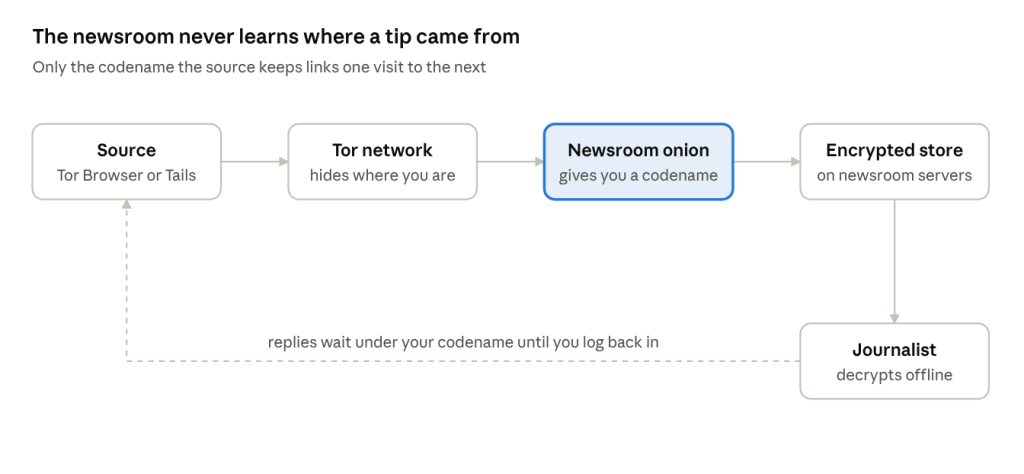
This is what happens when you use one.
- Open Tor Browser (or, better, boot Tails) and go to the newsroom’s onion address. Tor hides your location from the newsroom, and hides the newsroom from anyone who is monitoring your connection.
- You are given a codename, a short sequence of random words. You don’t choose a username or provide an email address. This codename is the only thing that links your first visit to any later ones, so keep it somewhere safe and offline.
- You upload files or send a message. The newsroom’s server encrypts them so that only the journalists’ keys can decrypt them.
- A journalist reads it on a separate, secured computer. Many newsrooms now use the SecureDrop Workstation, which keeps documents in isolated compartments so that a malicious file cannot reach the rest of the system.
- If they respond, the reply waits for you. It sits in the inbox linked to your codename until you log in again with it. Nothing is ever sent to you by email or text message.
This final stage is where many first-time sources slip up. SecureDrop is slow by design. The journalist may take several days to read your submission, and you have to come back to check. If you lose your codename, the conversation is lost for good, which is a security feature rather than a flaw. The official SecureDrop source guide walks through the same steps with screenshots.
If you’re unfamiliar with any of these terms, our Tor glossary explains onion services, circuits and related ideas in plain English.
The directory#
Every outlet below appears in the official SecureDrop directory maintained by the Freedom of the Press Foundation, which only includes instances that meet its security requirements. Where a newsroom also publishes its address on its own website, we link that page too. Get the onion address from one of these two places, then check it against the other. If the two don’t match, stop.
| Organisation | Country | Where it publishes its address |
|---|---|---|
| The Washington Post | USA | washingtonpost.com/securedrop and the FPF directory |
| ProPublica | USA | propublica.org/tips, SecureDrop section, and the FPF directory |
| The New York Times | USA | Its tips page and the FPF directory |
| The Guardian | UK and USA | Its SecureDrop page and the FPF directory |
| Bloomberg News | USA | The FPF directory |
| Forbes | USA | The FPF directory |
| CBC | Canada | cbc.ca/securedrop and the FPF directory |
| The Globe and Mail | Canada | sec.theglobeandmail.com/securedrop and the FPF directory |
| Financial Times | UK, USA, Europe, Asia | The FPF directory |
| The Economist | International | The FPF directory |
| Der Spiegel | Germany | The FPF directory |
| Süddeutsche Zeitung | Germany | The FPF directory |
| Aftenposten | Norway | The FPF directory |
| Dagbladet | Norway | The FPF directory |
| NRK | Norway | The FPF directory |
| Aftonbladet | Sweden | The FPF directory |
| News24 | South Africa | The FPF directory |
| Forbidden Stories | International | The FPF directory |
| Whistleblower Aid | USA | The FPF directory |
A few notes on reading this list.
It’s a starting point, not the whole directory. The FPF list is longer and changes whenever newsrooms add or retire instances. Always check the live directory rather than relying on any copy, including ours.
Whistleblower Aid is a nonprofit law firm, not a newsroom. It appears in the list because it uses SecureDrop to receive confidential messages from people who may need legal advice before coming forward. If you’re worried about the legal side of what you’re about to do, talking to a lawyer first is usually the smartest move.
Some newsrooms have short names in Tor Browser. ProPublica’s tips page, for example, gives a readable address ending in .securedrop.tor.onion alongside its full one. These short names came out of a 2020 project between the Tor Project, FPF and the EFF, and Tor Browser translates the short name into the real address for you. They’re convenient, but only use one if the newsroom itself publishes it.
Looking for other official onion sites? Our official onion mirrors directory lists news sites, NGOs and services that run onion versions of their regular websites, and our monthly mirror status report shows which of them are currently online. If your main aim is to read the news safely rather than send a tip, see news onion sites by language. Alec Muffett’s long-running Real-World Onion Sites list also pulls its SecureDrop entries straight from the FPF directory.
How to check an address before you send anything#
A SecureDrop address is a v3 onion address, made up of 56 letters and digits followed by .onion. Those characters are not random. They are the server’s public key written out, so if you use that exact address, you are talking to whoever holds the matching private key and no one else. That’s a strong guarantee, but it only protects you if the address itself is the genuine one. Here’s how to make sure.
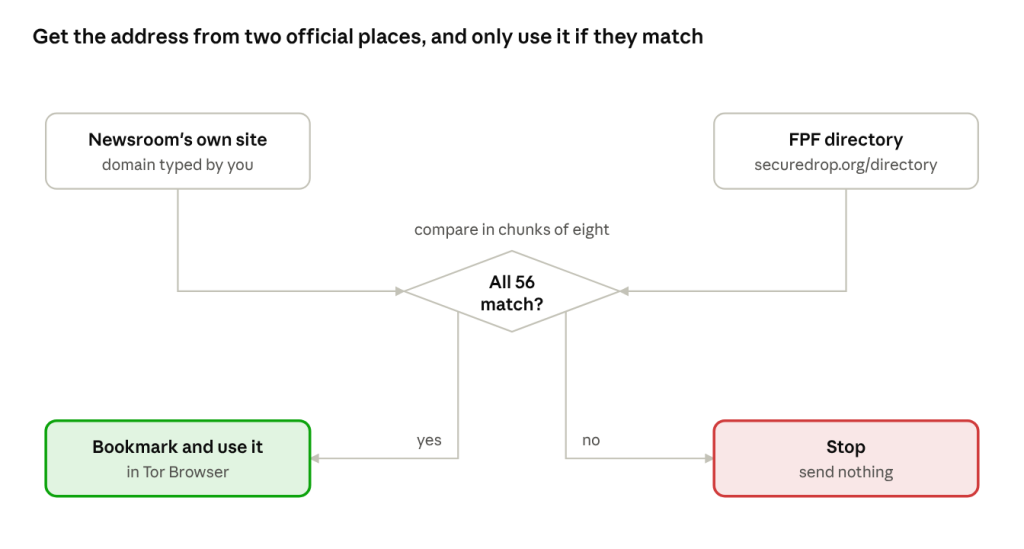
- Start from the newsroom’s own website, on the normal web. Type the newsroom’s domain yourself rather than clicking a search advert or a link in an email. Look for its tips or SecureDrop page. Larger organisations usually link to it from their footer or from a “Contact us” or “Send a tip” page.
- Make sure the page really belongs to them. Check the domain in the address bar one letter at a time. A page on washingtonpost.com is the Post. A page on washington-post-tips.com is not.
- Cross-check with the FPF directory. Go to securedrop.org/directory and find the same outlet. The onion address there should match the one on the newsroom’s page exactly. The directory is also available as an onion service, linked in the securedrop.org footer, if you’d rather check it over Tor.
- Compare all 56 characters, not just the first and last ones. Scammers create addresses that share the first and last few characters with genuine ones, because most people only check those. Compare the characters in groups of eight. It takes a minute, and it’s the most useful thing on this page.
- Look for the Onion-Location hint. Some newsrooms set up their tips page so that Tor Browser shows a purple “.onion available” button. That button is generated by the newsroom’s own website through Onion-Location, so it’s a good sign you’re on the right track.
- Bookmark it in Tor Browser once it’s verified. Next time, use the bookmark instead of searching again.
Knowing what the real SecureDrop page looks like helps too. It opens with a short introduction from the newsroom and two choices, roughly “Submit documents for the first time” and “Check for a response”, along with a warning if your Tor Browser security level isn’t set to Safest. It will never ask for your name, email address, phone number, password or payment. If an “onion SecureDrop” asks for any of these, close it.
For the general version of this process, which works for any onion site, see how to verify an onion address. And for the patterns scammers use on Tor link lists, our guide to hidden wiki scams is well worth five minutes.
The habits that matter more than the software#
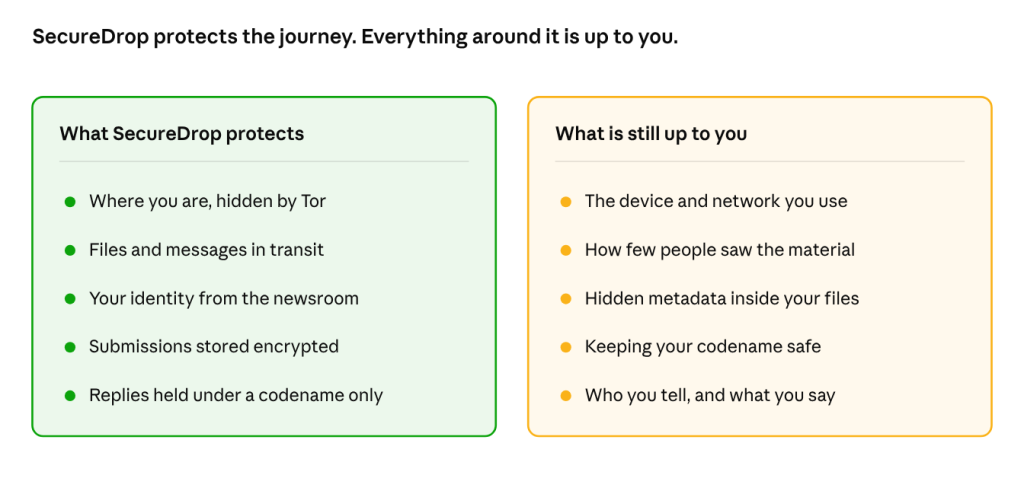
SecureDrop is very good at one thing. It lets you send files to a newsroom without the newsroom, or anyone monitoring the connection, finding out where they came from. It cannot protect you from what happens before you open Tor Browser or after you close it. Most sources who are identified aren’t caught because of faulty encryption. It’s the circumstances around the leak that give them away.
Before you send#
Avoid anything your employer provides or monitors. That means no work laptop, no work phone, no office Wi-Fi, and no personal device enrolled in your employer’s management software. Even browsing a newsroom’s tips page from your workplace can be logged.
Use a device and a network that aren’t linked to you. The Freedom of the Press Foundation and many news organisations recommend Tails, an operating system that starts from a USB stick, routes all your activity through Tor and erases everything when you shut down. If you’d rather use Tor Browser on your own computer, set the security level to Safest. Our guide to Tor Browser security levels explains what that option changes, and the EFF’s Surveillance Self-Defense guides are a good companion read.
Think about who else had access. If only five people saw a document, a newsroom publishing it narrows the search to five. Consider whether the material itself points to you, and tell the journalist so. Responsible reporters will take this into account and may choose to describe the document rather than publish it.
Check your files for hidden information. Office documents and PDFs store author names, edit histories and device details. Photos contain location data. Many printers add nearly invisible tracking dots to every page. Tails includes a tool called mat2 that strips common metadata, and SecureDrop’s journalist tools remove some as well, but don’t depend on either. If a file was only ever sent to you, its exact copy can identify you.
While you’re sending#
Write the codename down offline. Paper, kept somewhere private, is fine. Don’t save it in your phone, in a cloud note or in your browser.
Explain what the material is and why it matters. Journalists receive a great deal of noise through SecureDrop, from security testers and spam to conspiracy theories. A Tow Center study at Columbia Journalism School found that one experienced reporter judged fewer than ten per cent of his submissions useful. A short note explaining what the material shows, how you came by it in general terms, and how it can be verified will make yours stand out.
Don’t announce it. Don’t tell colleagues, friends or anyone online that you’ve contacted a newsroom.
After you’ve sent it#
Come back to check for replies, but not on a fixed schedule. Log in with your codename from the same safe setup each time. It might be several days before a reply arrives.
Be careful about moving to another channel. A journalist might suggest Signal or another app so you can talk faster. That can be fine, but understand that it may link a phone number to you. Ask what they recommend, then make up your own mind.
Expect the story to take time, or not to appear at all. Not every tip becomes a story, and that doesn’t mean something went wrong.
Using Tor and SecureDrop is legal in most countries, but leaking can carry serious legal risk depending on what you’re sharing and where you live. Our article on the legal and ethical use of Tor covers the basics, and organisations such as Whistleblower Aid can give confidential legal advice before you act. For the common mistakes that undo the anonymity Tor provides, see Tor mistakes that break anonymity.
What’s changed in 2026#
For sources, almost nothing has changed. You still open Tor Browser, go to the onion address, take the codename you’re given and upload. Most of 2026’s work has happened on the newsroom side, which is good news, because it makes the system easier for journalists to run safely. Every release is listed on the SecureDrop GitHub page.
| Release | Date | What it means |
|---|---|---|
| SecureDrop 2.16.1 | 8 July 2026 | Fixed a low-severity issue where some onion-service credentials were copied to the monitoring server |
| SecureDrop 2.16.0 | 24 June 2026 | API and performance fixes, a journalist session fix and tighter login throttling |
| SecureDrop 2.15.0 | 16 April 2026 | Turned on the updated API that the new journalist app needs |
| SecureDrop 2.14.0 | 19 February 2026 | Admin tooling fixes and updated guidance on the source page |
The bigger changes are on the journalist side. In its review of 2025, the Freedom of the Press Foundation said it had completely rewritten its journalist app and planned to launch it after a security audit in early 2026, and the 2.15.0 server release switched on the API the new app depends on. During 2025 the SecureDrop Workstation also replaced Whonix with plain Tor and added support for thousands more printers, while SecureDrop servers moved to Ubuntu 24.04 through an automatic upgrade.
Further out, FPF is working on the SecureDrop Protocol, a redesign that would encrypt messages end to end between source and journalist and hide even more metadata from the server. A paper describing it was published through the IACR in 2026, and FPF has said it won’t go into production until it has passed a full security assessment, including one that accounts for future quantum attacks. There’s no need to wait for it. Today’s SecureDrop is well tested and is what newsrooms use.
When the outlet you want doesn’t run SecureDrop#
SecureDrop needs dedicated hardware and dedicated staff, so many smaller and regional newsrooms don’t run it. That doesn’t mean you have no safe options.
- Signal. Many newsrooms and individual reporters list a Signal number on their tips page. It’s end-to-end encrypted and easy to use, but it ties the conversation to a phone number. Use a number that isn’t linked to your name, and turn on disappearing messages.
- Encrypted web forms. Some organisations, ProPublica among them, offer an encrypted tip form that works in an ordinary browser. It’s simpler, but it doesn’t hide the fact that you visited the site, so open it in Tor Browser.
- Post. It still works. ProPublica, for example, suggests sending documents without a return address, ideally from a public mailbox rather than one near your home or work.
- A specific reporter. If a journalist has already covered your subject, check their staff page or social media profiles for the secure contact details they personally publish.
- A different outlet. If your story matters, an outlet that does run SecureDrop may be the safer route. Check the FPF directory for one.
For general help getting Tor running, start with how to install Tor Browser safely or go straight to the official download page. If it won’t connect, our nine fixes for Tor connection problems cover clocks, bridges and the rest, and if you’re in a censored country, our guide to bridges, Snowflake and WebTunnel will help you get through. If you’re weighing Tor against a VPN for this, our Tor Browser vs VPN guide explains why Tor is the right tool here.
The bottom line#
A SecureDrop directory is only as trustworthy as the place it got its addresses from. That’s why this one sends you back to the newsrooms themselves and to the Freedom of the Press Foundation, rather than asking you to trust a string of characters on our page. Get the address from the source, check it in two places, use a device and network that aren’t tied to you, and keep your codename safe. The software will do the rest.
Sources#
- SecureDrop directory, Freedom of the Press Foundation
- Looking back at 2025, SecureDrop news
- SecureDrop releases, GitHub
- Introducing the SecureDrop Protocol, SecureDrop news
- The SecureDrop Protocol, end-to-end encrypted whistleblowing for all, IACR ePrint (2026)
- Guide to SecureDrop, Tow Center for Digital Journalism, Columbia Journalism Review
- How to contact ProPublica or send a tip securely, ProPublica
- SecureDrop, Wikipedia (history)
- Tor Browser human-memorable onion names, The Register (2020)